Here is the final edit of our music video for our main task:
Showing posts with label 3. Production. Show all posts
Showing posts with label 3. Production. Show all posts
Thursday, 28 April 2016

Website
You can find our finished website here at:
http://08wellma.wix.com/madeona2website
Over the past few weeks we have been creating a website as an ancillary task to accompany the video and the CD cover.
We deci. . ded to use the webpage creator Wix to get the best possible design for our website. We chose a template which had a similar look to what we were hoping to make and began to edit.
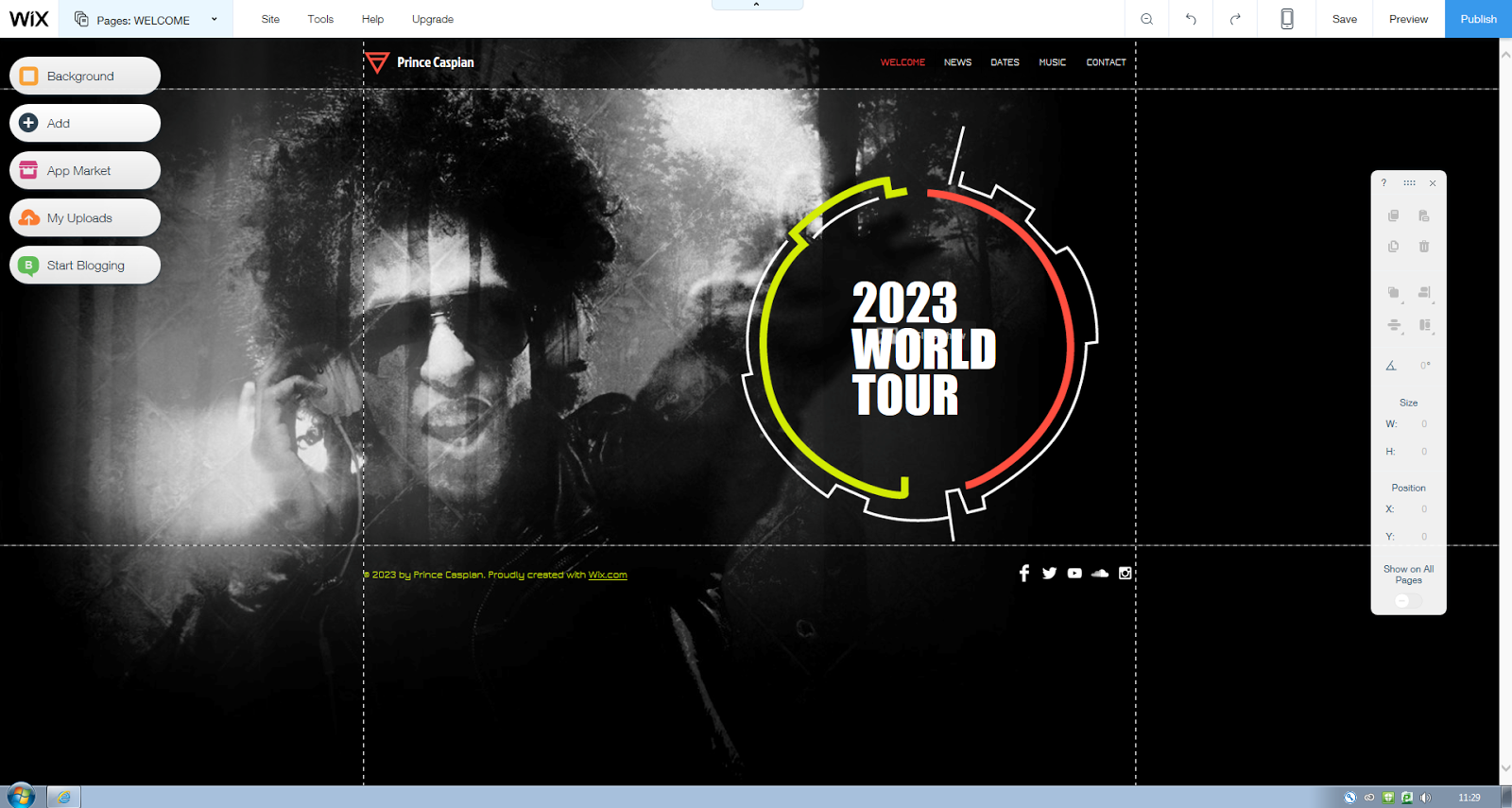
 This was the original template's home page which appeared to need a lot of work to change. Firstly, we needed to change the background to something more appropriate to our project (which would feature on all of the pages that follow) after several different backgrounds were tested, we opted for a scenic screen capture from our video which we then had to edit so that the lighting and colours allowed for text to be viewed. We also removed the large icon and text from the centre and replace it with a large title of our artist to be placed at the very top of the page. The social media links were also moved and were each linked to Madeon's official pages. The navigation buttons at the bottom were only added to this page whilst the ones at the top remained in the header on the rest of the pages.
 The News page was fairly straight forward in terms of the design. We simply split the text box which scrolled down the page into two parts in order to have everything instantly seen without the need to scroll down as this affected the size of the background picture. Once we had finished doing that, we were able to fill in the information with events including the plan for the music video and the release of the song we were covering. We also decided at this point to colour code each page, making the boxes red throughout as opposed to the flashing multi-coloured ones that were originally there.
We did a followed a near identical process for the news page, splitting the text box and adding in information about a tour including dates, location and price.


For the music page, we had to replace the music app that already existed and opted for YouTube clips with links to the same songs on iTunes. We had originally had 4 videos on the page, however due to the aspect ratio on certain computers, not all could be viewed properly.

We decided to completely scrap the bio page as it was not vital to the website and it didn't seem to blend very well with the other content.

We created our own brand new Store page which frequently features on real artists' websites selling merchandise etc. We added images of genuine Madeon merchandise and made some realistic prices to accompany them.

The header contains the Artist's title alongside the logo From the initial 'M'. This logo is also a button that links directly to the homepage.
Monday, 25 April 2016
Saturday, 26 March 2016
Friday, 26 February 2016
Editing the music video
The music video is very close to completion. each clip has been added to the editing software and only a few still need to be edited have effects added to them.
 The task was a little more difficult and complicated than it has been in previous products with a grand total of 5 tracks having to be used to allow the clips to flow together effectively and to allow the effects to be further enhanced.
The Feedback we received was as follows:


Premiere Pro features a huge variety of different effects which are available for use in our production meaning that our options in terms of enhancing pictures were almost limitless.
We have completed several drafts at different stages and uploaded them to YouTube. The video below is the latest draft and we began to ask for feedback from several sources.
The Feedback we received was as follows:


While a lot of the more constructive feedback was aimed at our acting skills, the parts aimed at various editing techniques that we either needed to add or remove was very helpful and we have already begun to act upon improving it for the final piece.
One of the more significant comments alerted us to the fact that there were an unnecessarily high number of fades used for transitioning in the edit which often confused the viewer as to what was happening. We made sure to act swiftly on this matter and removed several fades, replacing them with other means of transitioning between shots.Another criticism was that the difference in emotions between the two characters was not clear enough in the editing. We have so far addressed this by changing the lighting effects such as the saturation alongside the luma keying function in order to make the contrast between the two characters much clearer.

Saturday, 20 February 2016
Fourth and Fifth day of filming (14-15/2/16)
Our final days of filming took place on 14th-15th February in which we were able to use the entire weekend to capture the remaining shots indicated on our storyboard alongside extra shots that we thought could come in handy during post production.
 Once again, the school's booking system was used in the same way.


Saturday Shoot Plan:
Sunday Shoot Plan:
Friday, 19 February 2016
Creating the CD cover
While we decided to have just one person work on the CD cover, similarly to how we made the website, we all added in our own input at various stages throughout.


After deciding on a picture from our shoot, we spoke about the various ways in which the photo could be improved and adjusted before adding in the titles. One of the key suggestions was to exaggerate the black sections of the sign as they had become faded. This meant that each individual square of black on the sign had to be coloured over (often meaning pixel by pixel).
It was also suggested that the colour gradients and contrast of the picture as a whole needed changing. Something far easier to do throughout an entire picture on Photoshop.

This change in colour was kept up throughout the entire booklet in order to establish a house style and make it appear authentic.
In order to put it all together, Adobe Illustrator was used which allowed everything to be printed in the perfect size for a CD case.
Thursday, 11 February 2016
Risk assessment
We have filled out a risk assessment form in order to address the various hazards and dangers that we may face on set. After scouting the location for our video we were able to determine that any potential injuries were merely trivial.


Wednesday, 10 February 2016
Risk Assessment
Before shooting, we filled out a risk assessment to ensure that any injury sustained whilst was accounted for. After viewing the location we were able to accurately determine the likelihood and severity of most injuries.


Friday, 5 February 2016
Filming with mobile devices?
I have been toying with the idea of using a mobile device such as a phone, iPod etc. to film some scenes with in order to fully convey the modern tone of the genre through the video. I decided to practice with an old unused phone that is capable of shooting in HD. However, I was very adamant that the shots themselves had to be steady enough to look professional whilst still appearing as though no mounts have been used.
In order to test how steady the shots could be, I spent some of my own time practice by recording different angles whilst walking around both at home and at school. The problem I encountered when doing so at school was that people often walked in shot meaning that I often had to delete the videos after viewing them as I couldn't use people in my evidence without consent.
I also attempted the same with my regular phone that I use day to day. However, I was unhappy with the lower quality and the memory filled rapidly.
In the end we decided against using mobile devices to record in order to achieve a fully professional look.
In order to test how steady the shots could be, I spent some of my own time practice by recording different angles whilst walking around both at home and at school. The problem I encountered when doing so at school was that people often walked in shot meaning that I often had to delete the videos after viewing them as I couldn't use people in my evidence without consent.
I also attempted the same with my regular phone that I use day to day. However, I was unhappy with the lower quality and the memory filled rapidly.
In the end we decided against using mobile devices to record in order to achieve a fully professional look.
Monday, 1 February 2016
Third day of filming (30/1/16)
Filming resumed on Saturday 30th January where we, again intended to use the entire weekend to dedicate to filming. unfortunately due to illness the Sunday shoot had to be cancelled.
On this day we decided to lip sync the entire song in various different locations in order to fill some of the gaps in between the intro and end. this allowed us further understanding of what narrative parts had to be shot and where they had to be in terms of chronology. All we needed to record after this was the storyboarded shots for the video during the break, buildup, drop and outro of the song.
 Again, we utilised the school's online booking system in order to hire a DSLR and tripod for the weekend.

On this day we decided to lip sync the entire song in various different locations in order to fill some of the gaps in between the intro and end. this allowed us further understanding of what narrative parts had to be shot and where they had to be in terms of chronology. All we needed to record after this was the storyboarded shots for the video during the break, buildup, drop and outro of the song.


Shoot Plan
Tuesday, 12 January 2016
First two days of filming (9-10/1/16)
We officially began filming the music video on Saturday 9th January. We intended to use both days of the weekend to film, taking out a few hours of our day to dedicate to doing so.
We had intended to film for around two hours on both days. However, after suffering technical difficulties which could not be resolved on location, we were forced to cut the day short after just half an hour and had to film for longer on the Sunday.
During this filming period, we focused on the intro and the end of the song in order to gain clear direction as to where the main body of the video would lead. We already had a rough idea with the help of our storyboard but still had to decide on which shots would be more possible and effective in certain ares.
 Using the school's online equipment booking system we were able to hire a camera and tripod for the weekend.

We had intended to film for around two hours on both days. However, after suffering technical difficulties which could not be resolved on location, we were forced to cut the day short after just half an hour and had to film for longer on the Sunday.
During this filming period, we focused on the intro and the end of the song in order to gain clear direction as to where the main body of the video would lead. We already had a rough idea with the help of our storyboard but still had to decide on which shots would be more possible and effective in certain ares.


Saturday Shoot Plan:
Sunday Shoot Plan:
Sunday, 3 January 2016
CD Practice 2

We have done further practice with CD artwork in order to further improve our skills in Photoshop etc. This example of The Prodigy's 'The Day is my Enemy' was the inspiration for this practice.

This parody is an interesting take on the iconic CD cover and incorporates aspects found in our local area.
Tuesday, 29 December 2015
Importance of the pitch

We have further improved our pitch to suit the areas which seemed to lack detail, such as how our audience will be targeted.
Friday, 18 December 2015
Green screen practice

Wednesday, 16 December 2015
CD Cover Practice
In order to prepare for our ancillary task, we decided to practice our skills in Photoshop to ensure the end product was as good as possible.


In this attempt we decided to emulate a cover similar to that of Madeon's album. We incorporated his real logo (the diamond with two brackets) in order to get an understanding of how a logo could fit into a CD cover. These examples were inspired by the real covers below:


Thursday, 22 October 2015
Music Video Pitch
In preparation for our music video, we had to create a one page pitch to express our intentions:


Subscribe to:
Posts (Atom)